


TMS320F2837xD Dual-Core Microcontrollers
ProductFolderOrderNowTechnicalDocumentsTools &SoftwareSupport &CommunityAn IMPORTANTNOTICEat the end of this datasheetaddressesavailability,warranty,changes,use in safety-criticalapplications,intellectualpropertymattersand otherimportantdisclaimers.PRODUCTIONDATA.TMS320F28379D,TMS320F28378D,TMS320F28377DTMS320F28376D, TMS320F28375D, TMS320F28374DSPRS880M–DECEMBER2013–REVISEDJUNE2020TMS320F2837xDDual-CoreMicrocontrollers1 DeviceOverview11.1Features1• Dual-corearchitecture– Two TMS320C28x32-bitCPUs– 200 MHz– IEEE754 single-precisionFloating-PointUnit(FPU)– TrigonometricMathUnit (TMU)– Viterbi/ComplexMathUnit (VCU-II)• Two programmableControlLaw Accelerators(CLAs)– 200 MHz– IEEE754 single-precisionfloating-pointinstructions– Executescodeindependentlyof mainCPU• On-chipmemory– 512KB(256KW)or 1MB(512KW)of flash(ECC-protected)– 172KB(86KW)or 204KB(102KW)of RAM(ECC-protectedor parity-protected)– Dual-zonesecuritysupportingthird-partydevelopment– Uniqueidentificationnumber• Clockand systemcontrol– Two internalzero-pin10-MHzoscillators– On-chipcrystaloscillator– Windowedwatchdogtimermodule– Missingclockdetectioncircuitry• 1.2-Vcore,3.3-VI/O design• Systemperipherals– Two ExternalMemoryInterfaces(EMIFs)withASRAMand SDRAMsupport– Dual6-channelDirectMemoryAccess(DMA)controllers– Up to 169 individuallyprogrammable,multiplexedGeneral-PurposeInput/Output(GPIO)pins with inputfiltering– ExpandedPeripheralInterruptcontroller(ePIE)– MultipleLow-PowerMode(LPM)supportwithexternalwakeup• Communicationsperipherals– USB2.0 (MAC+ PHY)– Supportfor 12-pin3.3 V-compatibleUniversalParallelPort (uPP)interface– Two ControllerAreaNetwork(CAN)modules(pin-bootable)– Threehigh-speed(up to 50-MHz)SPI ports(pin-bootable)– Two MultichannelBufferedSerialPorts(McBSPs)– FourSerialCommunicationsInterfaces(SCI/UART)(pin-bootable)– Two I2C interfaces(pin-bootable)• Analogsubsystem– Up to four Analog-to-DigitalConverters(ADCs)– 16-bitmode– 1.1 MSPSeach(up to 4.4-MSPSsystemthroughput)– Differentialinputs– Up to 12 externalchannels– 12-bitmode– 3.5 MSPSeach(up to 14-MSPSsystemthroughput)– Single-endedinputs– Up to 24 externalchannels– SingleSample-and-Hold(S/H)on eachADC– Hardware-integratedpost-processingof ADCconversions– Saturatingoffsetcalibration– Errorfromsetpointcalculation– High,low, and zero-crossingcompare,with interruptcapability– Trigger-to-sampledelaycapture– Eightwindowedcomparatorswith 12-bitDigital-to-AnalogConverter(DAC)references– Three12-bitbufferedDACoutputs• Enhancedcontrolperipherals– 24 PulseWidthModulator(PWM)channelswithenhancedfeatures– 16 High-ResolutionPulseWidthModulator(HRPWM)channels– Highresolutionon bothA and B channelsof8 PWMmodules– Dead-bandsupport(on bothstandardandhigh resolution)– Six EnhancedCapture(eCAP)modules– ThreeEnhancedQuadratureEncoderPulse(eQEP)modules– EightSigma-DeltaFilterModule(SDFM)inputchannels,2 parallelfiltersper channel– StandardSDFMdatafiltering– Comparatorfilter for fast actionfor out ofrange
TMS320F2837xD Dual-Core Microcontrollers
Technical Reference Manual
TMS320F2837xDDual-CoreMicrocontrollersTechnicalReferenceManualLiteratureNumber:SPRUHM8IDecember2013–RevisedSeptember2019
User Guide LauchPad
1SPRUI77C–August2016–RevisedMarch2019SubmitDocumentationFeedbackCopyright© 2016–2019,TexasInstrumentsIncorporatedLAUNCHXL-F28379DOverviewUser's GuideSPRUI77C–August2016–RevisedMarch2019LAUNCHXL-F28379DOverviewTheC2000™ LAUNCHXL-F28379DLaunchPad™ is a completelow-costdevelopmentboardfor theTexasInstrumentsDelfino™ F2837xDdevices.The LAUNCHXL-F28379Dkit featuresall the hardwareand softwarenecessaryto developapplicationsbasedon the F2837xDmicrocontrollers.ThisLaunchPadis basedon the supersetF28379Ddevice,and easilyallowsusersto migrateto lowerfeatureset and/orlowerpin countF2837xdevicesoncethe designneedsare known.It offersan on-boardJTAGdebugtoolallowingdirectinterfaceto a PC for easyprogramming,debugging,and evaluation.In additionto JTAGemulation,the USBinterfaceprovidesa UARTserialconnectionfromthe F28379Ddeviceto the host PC.Contents1Introduction...................................................................................................................22Kit Contents...................................................................................................................33Installation....................................................................................................................44GettingStartedWiththe LAUNCHXL-F28379D.........................................................................55HardwareConfiguration.....................................................................................................56LAUNCHXL-F28379DHardware..........................................................................................87References..................................................................................................................268FrequentlyAskedQuestions(FAQ)......................................................................................27List of Figures1LAUNCHXL-F28379DBoardOverview...................................................................................32P01_BlockDiagram........................................................................................................103P02_XDS100v2.............................................................................................................114P03_Power..................................................................................................................125P04_ADCIND...............................................................................................................136P05_PWM-DAC............................................................................................................137P06_BoosterPackHeaders...............................................................................................148P07_F28379D-PWR.......................................................................................................149P08_F28379D-IO1.........................................................................................................1510P09_F28379_IO2..........................................................................................................1611P10_EX-Headers...........................................................................................................1712Top...........................................................................................................................1813GND..........................................................................................................................1814Route1.......................................................................................................................1815Route2.......................................................................................................................1816VDD..........................................................................................................................1817Bottom.......................................................................................................................1818Top SilkscreenOverlay....................................................................................................1819BottomSilkscreenOverlay................................................................................................1820Top Pad Master............................................................................................................1921BottomPad Master........................................................................................................1922................................................................................................................................28List of Tables
TMS320F28379D LaunchPad Quick Start Guide
HoosterPack EcosystemHUCKCONV HoosterPackG Experiment with switching powerG Supported by PowerSUITEG OnGboard Huck Converter and:ctive LoadSee them all atti&comMboosterpacks>>Software ToolsDesignDRIVECreate designs for industrialdrives applicationsSupport for various motortypes> sensing technologies>encoder standards> andcommunications networks))www&ti&comMDESIGNDRIVEProfessional SoftwareTtoolsLaunchPad is also supported by professionalIDEs that provide industrialGgrade features andfull debugGcapability& Set breakpoints> watchvariables . more with LaunchPad&www&ti&comMccsCode Composer Studio IDETMMotor Drive HoosterPacksG HOOSTXLGDRVF0X8 andHOOSTXLGDRVF0X5G 31 V> 8X : and 15 V> 85 :G Integrated ThreeGPhaseMotor DriversResourcesti&comMlaunchpad{{Code examplesOpen Source Design FilesDocumentationExample projectsVideosTutorialsOther TI productsHelow are the pins available on the HoosterPack connector:lso shown are functions that map with the HoosterPack standard&R Note that to comply with the I3C channels of the HoosterPack standard> a softwareGemulated I3C must be used&RR Some LaunchPads do not 8XXl comply with the standard> please check your LaunchPad to ensure compatabilityfTD Denotes IMO pins that are interruptGcapable&BoosterPack standardLAUNCHXLWF58479D Pin mapLAUNCHXLWF58479D Pin mapBoosterPack standardLAUNCHXLWF58479D Pin mapLAUNCHXLWF58479D Pin mapLAUNCHXLWF58479DGNDRSTSPIA SIMOSPIA SOMI)4K4VVS(VS(SPI CSSPI CSSPI CSGNDGPIOVS(GPIOVS(GPIO!!RSTSPIMOSIMISOGPIOVS(GPIOVS(GPIOVS(PWMGPIOVS(GPIOVS(SPIA CSI5CA SCLI5CA SDASPIA CLKSCIB RXSCIB TXP45P09P08Pu7P000Pu6P55P06gP06lTimerTimerGPIOGPIOGPIOGPIOGPIOGPIOGPIOGPIOGPIOGPIOPWMPWMPWMPWMVS(VS(VS(VS(VS(VS(VS(VS(VS(VS()gVGNDVS(VS(VS(VS(VS(VS(VS(VS(SD0 D5SD0 CLK5OPXBARuSPI CSSPI CSSPI CSGNDGPIOVS(GPIOVS(GPIO!!RSTSPIMOSIMISOGPIOVS(GPIOVS(GPIOVS(PWMSPIB CS)4K4VAnalog InUARTRXV MCU(TXV MCU(GPIOVS(Analog InSPI CLKGPIOVS(I5CSCLSDA)gVAnalog InAnalog InAnalog InAnalog InAnalog InAnalog InGNDAnalog OutAnalog Out)4K4VAnalog InUARTRXV MCU(TXV MCU(GPIOVS(Analog InSPI CLKGPIOVS(I5CSCLSDA)gVAnalog InAnalog InAnalog InAnalog InAnalog InAnalog InGNDAnalog OutAnalog OutTimerTimerGPIOGPIOGPIOGPIOGPIOGPIOGPIOGPIOGPIOGPIOPWMPWMPWMPWMVS(VS(VS(VS(VS(VS(VS(VS(VS(VS(GNDRSTSPIB SIMOSPIB SOMI)4K4VVS(VS()gVGNDVS(VS(VS(VS(VS(VS(VS(VS(I5CB SCLI5CB SDASPIB CLKSCIC RXSCIC TXADCIN0lADCINC4ADCINB4ADCINA4ADCINC5ADCINB5ADCINA5ADCINA6P9gP049PguP97PugPg5Pl0Pl6P9lADCIN0gADCINCgADCINBgADCINAgADCINClADCINBlADCINAlADCINA0P6P0P5P4PWM0APWM0BPWM5APWM5BPWM4APWM4BPlPgP5lP0uOPXBAR0OPXBAR7DAC0DAC5Pu0P054P055Pg8Pg9P05lP05gP59SD0 D0SD0 CLK0PWMlAPWMlBPWMgAPWMgBDAC4DAClPuP7P8P9P06P00P0lP0gPWMuAPWMuBOPXBAR4OPXBARlSD5 CLK0SD5 D0SD5 D5SD5 CLK5OPXBAR5PuuP040P046Pu4PulP5uP57P5gc2014 Texas Instruments Incorporated. The platform bar,LaunchPad, and Code Composer Studio are trademarks of TexasInstruments. All other trademarks are the property of their respective owners.Disclaimer: www.ti.com/lit/SPRUI73Meet theTMS03XF3F04jDLaunchPadTMDevelopment KitPart Number* L:UNCHXLGF3F04jDSPRUI40:
Pinout
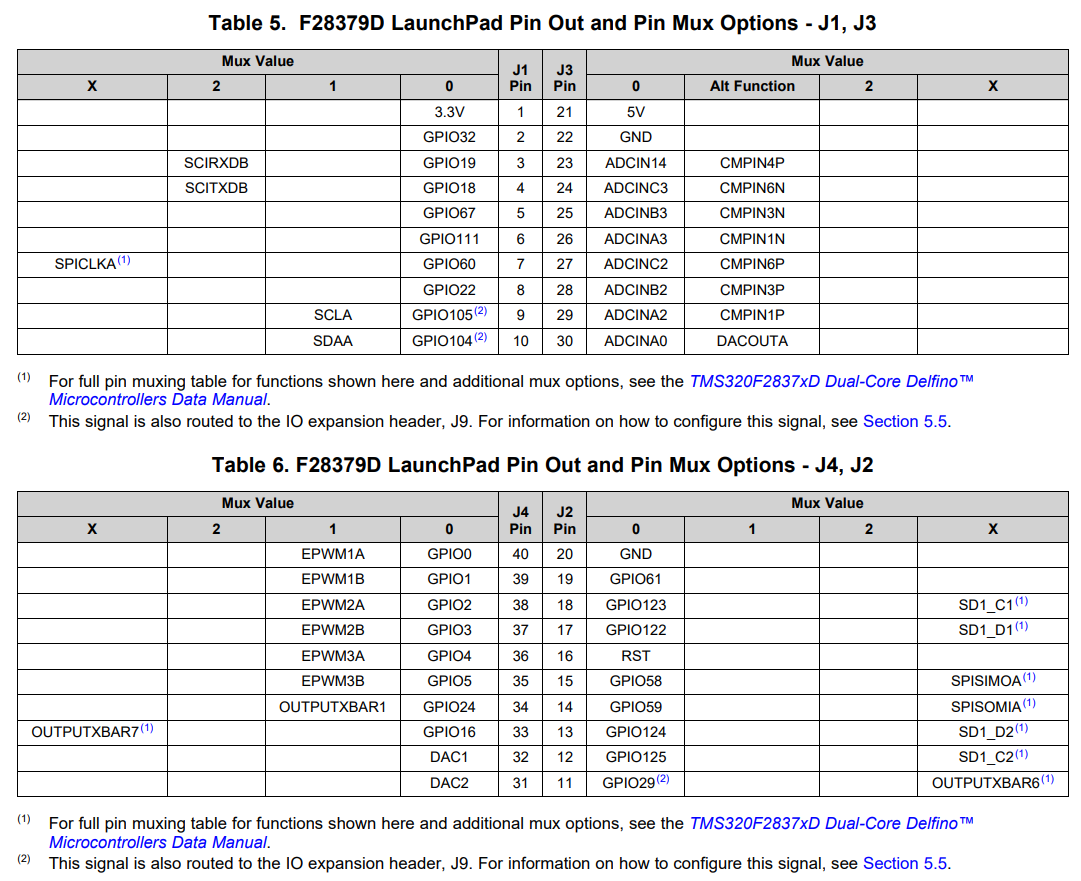
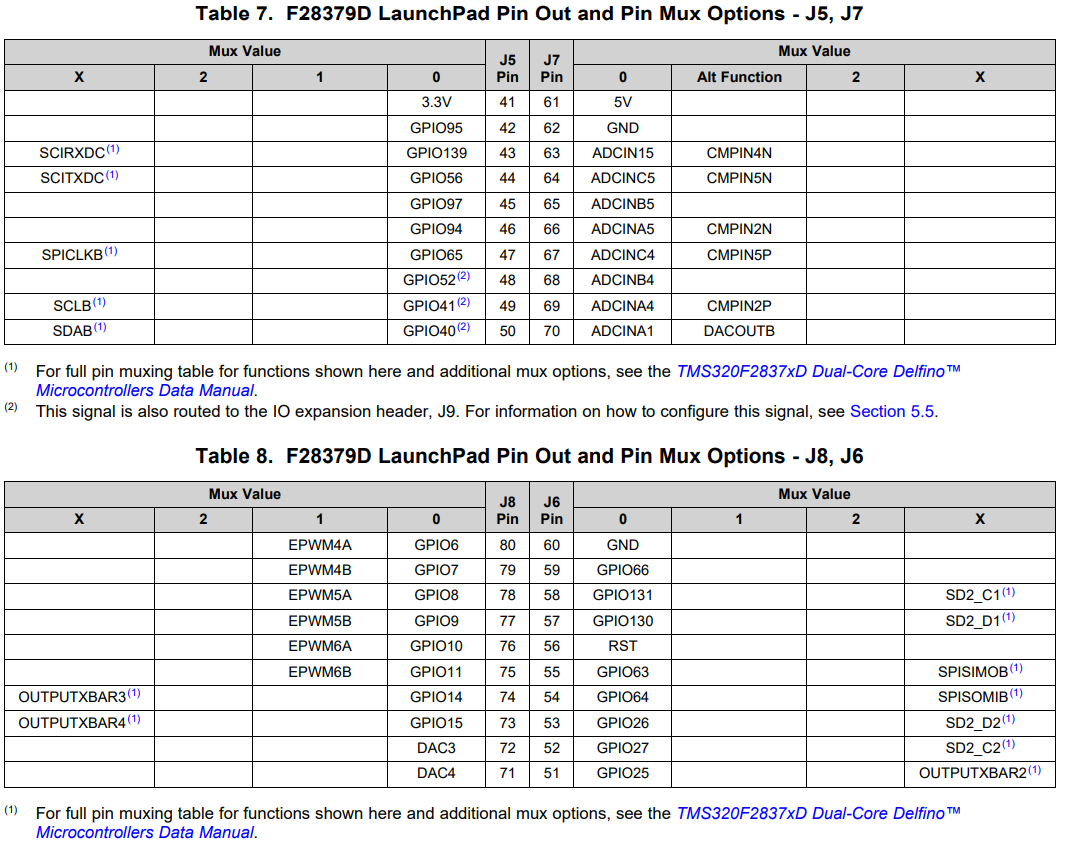
ePWM GPIO
7A: 157,12 12 use for CAN
7B: 158,13 13 not connected
8A: 159,14 14 = PIN74
8B: 160,15 15 = PIN73
157,158,159,60 use for DAC
9A: 16 = PIN33
9B: 17 use for CAN
10A: 18 = PIN4
10B: 19 = PIN3
11A: 20 USE FOR LEVEL SHIFT
11B: 21 USE FOR LEVEL SHIFT
12A: 22 = PIN8
12B: 23